How trainings go
There are different training scenarios depending on the skills, level and the context. Here are a few examples.
Using a simulator in construction
In an experimental training in Germany 1 participants were selected by a vocational training institution for 55 construction workers. A VR environment being developed in the project has the aim to involve the participants into a virtual site inspection which was implemented as a learning station inside of a bigger Learning Management System (LMS).
The learning goal of the VR learning station is to better understand and to determine the actual state of a built structure, with prospective planning and identification of the scope of repairing and finishing works, as crucial part of the education for craftsmen, especially in construction and plasterwork.
 The photo shows a still of the VR environment.
Results
A qualitative approach was used in design loop 2. In the following you will read some statements by the participants: “Made me curious and I liked it!“; “It's the future, very positive!“; "I like a lot of things!"; “It's like being right by the house”; “Do I really have to stop?” "Switching between self-learning and plenary can work. But technology is very important! “ Many participants feel strongly immersed into the virtual reality. Some examples: "I didn't notice at all that I was lying on the chair like this"; "F_ _ _, I'm slipping off the chair" However, there were also critical remarks: “To the information: ... Who wrote this? That doesn't sound like a plasterer!”; “Wrong terminology!”
Finally, a statement that illustrates the current limitations of VR: “I'd have to feel the wall here. So, I can't tell if there is anything. I mean whether it is cold or wet. Whether rough or smooth. Plaster is different. I must always feel.”
The quantitative results such as perceived workload, usability and fear and discomfort were very positive too.
The results suggest that VR applications have the potential to be included into curricula of craftsmen, and, more importantly, to be accepted by learners and teachers as a learning media and content.
1 Jan Spilski, Christoph Giehl, Sabine Schlittmeier, Thomas Lachmann et al. Potential of VR in the vocational education and training of craftsmen 2019
Using a VR simulator in welding
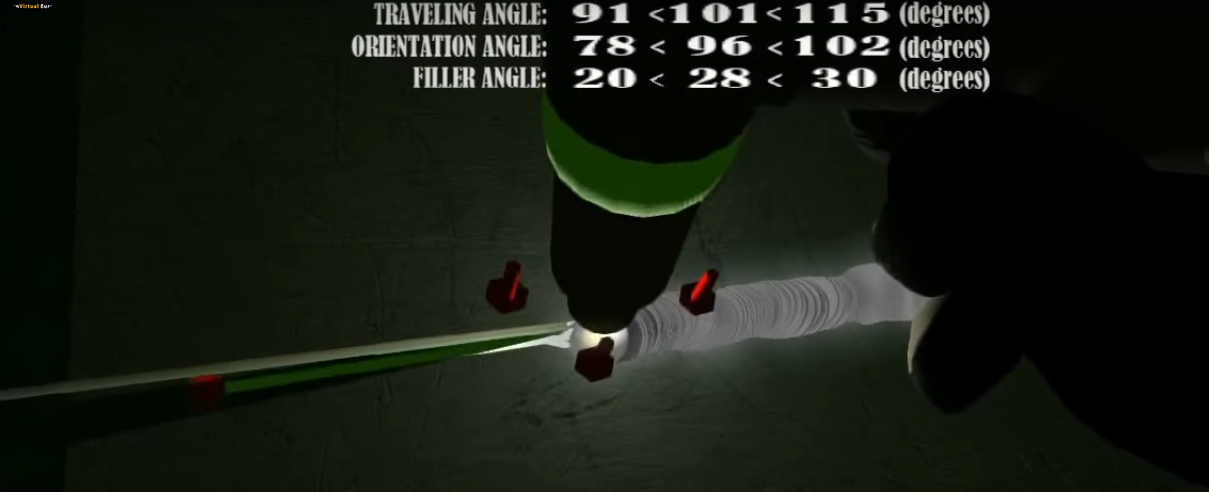 Source: LVE
Simulation in welding is a mature product in welding education. Here we present a short summary of a well designed and proven training in brief:
Integrated interactive training using MAG 135 process: 3-layer welding of a fillet joint
- training on the simulator - 40% (training + simulation),
- training on the real machine - 60%
Training Concept:
Trainer designs a Welding Procedure Specification (WPS) for the trainees to practice 3-layer welding of a fillet T- joint, steel sheets, in PB position.
Training is carried out in pairs. Foreseen training duration is 20 school hours.
The first part of the training is carried out on the simulator. The foreseen training duration is 40% (8 hours) The second part is real welding on real machine . The foreseen training duration is 60% (12 hours) The third part is visual inspection of the coupon/test piece-
Training sequence:
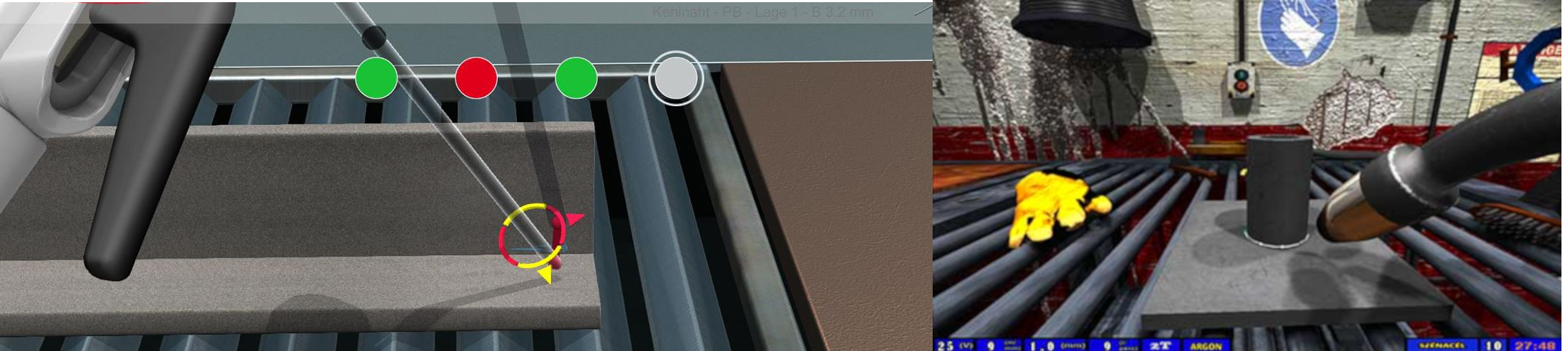
On the photo above that is what a trainee sees in virtual reality welding (these are two different simulators).
On the photo above that is what a trainee sees in virtual reality welding (these are two different simulators).
Who is the trainer? Virtual trainer called „Ghost” ensures best help possible in mastering the welding technique Colours of the „Ghost” (red, yellow or green) and the sound of welding show the current condition and provide for the necessary correction of the welding technique.
What is practiced?
Welding speed - level 1 Welding speed + stick out (MAG) / arc length (MMA) – level 2 Welding speed + stick out (MAG) / arc length (MMA) + tilt angle of the burner (MAG) / electrode (MMA) – level 3
Using AR simulation in welding training
The main differences between VR and AR training are:
- in AR, the welding parts are produced of plastic and made as similar to the real objects to be joined as possible instead of using virtual models.
- The torch, the materials and the welder's hand are visible during the training instead of seeing virtual objects and hands.
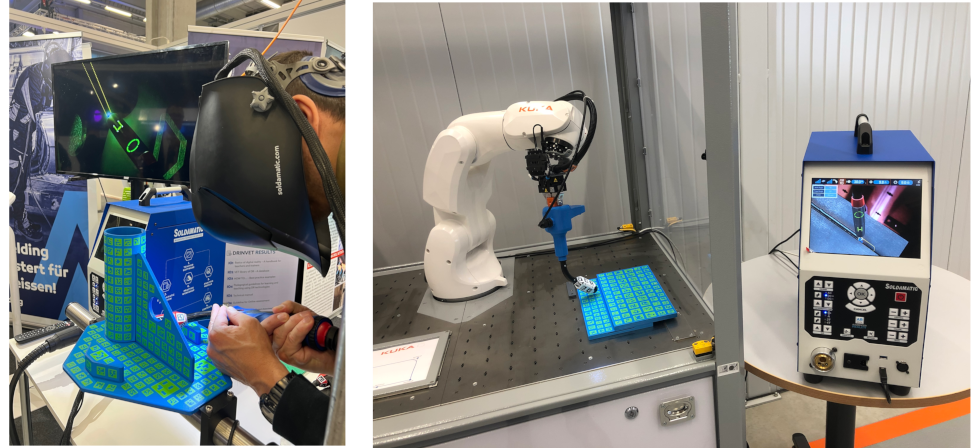
AR manual simulation and AR extension for robotic welding. Source: Seabery
The simulated training has five consecutive steps:
- Entrance testing. According to its results, a program and a training route for the welder are formed.
- A briefing that conducted with the analysis of theoretical material and fixing the “key” setting.
- Work with computer training devices and simulators. The work has two stages. The first stage is a theoretical training mode. The second stage is a simulation that includes 2 sections. The beginner trains to perform welding with given parameters. Then the trainee himself will set the necessary parameters. Depending on the context the simulator can work on a slower pace, or it can arrange a series of exercises for working out abilities and their automation. After skills shaping, usually tasks are trained. These tasks are designed by professional experiences. The tasks may include non standard situations.
- Debriefing. The simulator can detect the welding defects and find their causes. The training proces can be replayed and stored.
- Summing up of work and the test control. The program automatically generates a score sheet including an assessment of each trainee’s individual performance. It allows getting information about that must to be repeated and that to be focused on.
AR solution for manuals in ships
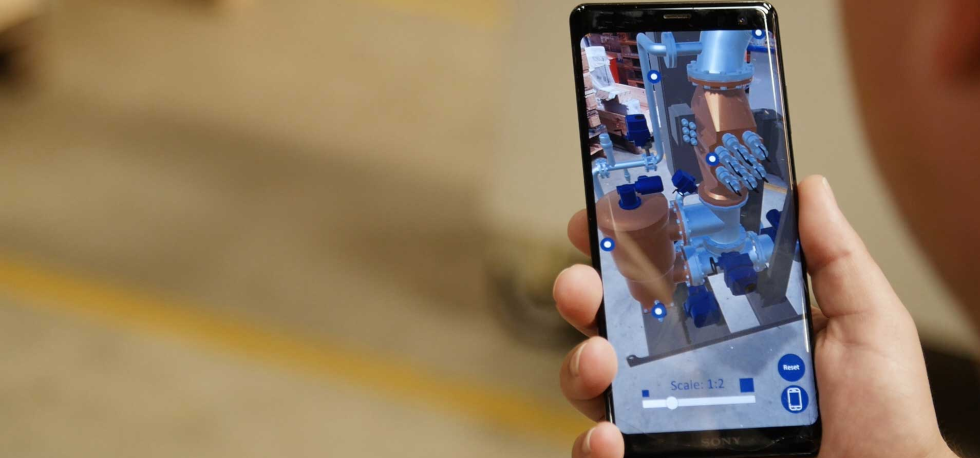 When a machinist in a ship needs support, it is difficult to perform the task while having to handle physical drawings and manuals. Therefore, an AR product for smartphones wanted to improve their support to the segment of smaller customers who contact them to receive help with maintenance and troubleshooting.
In the app, the user can search for information, guidelines, and error codes from a 3D model of the specific bilge water system. The AR technology makes it possible to see the whole system as a 3D model in which details about each component is supported with a direct link to the right manual and information. The app supports knowledge sharing both internally and externally. Source: Virsabi
When a machinist in a ship needs support, it is difficult to perform the task while having to handle physical drawings and manuals. Therefore, an AR product for smartphones wanted to improve their support to the segment of smaller customers who contact them to receive help with maintenance and troubleshooting.
In the app, the user can search for information, guidelines, and error codes from a 3D model of the specific bilge water system. The AR technology makes it possible to see the whole system as a 3D model in which details about each component is supported with a direct link to the right manual and information. The app supports knowledge sharing both internally and externally. Source: Virsabi